Start here
See Record Health Check in action
Use this annotated example to understand the card before configuring one. The card is placed on an Account Lightning record page and runs the Check Set selected in Lightning App Builder.
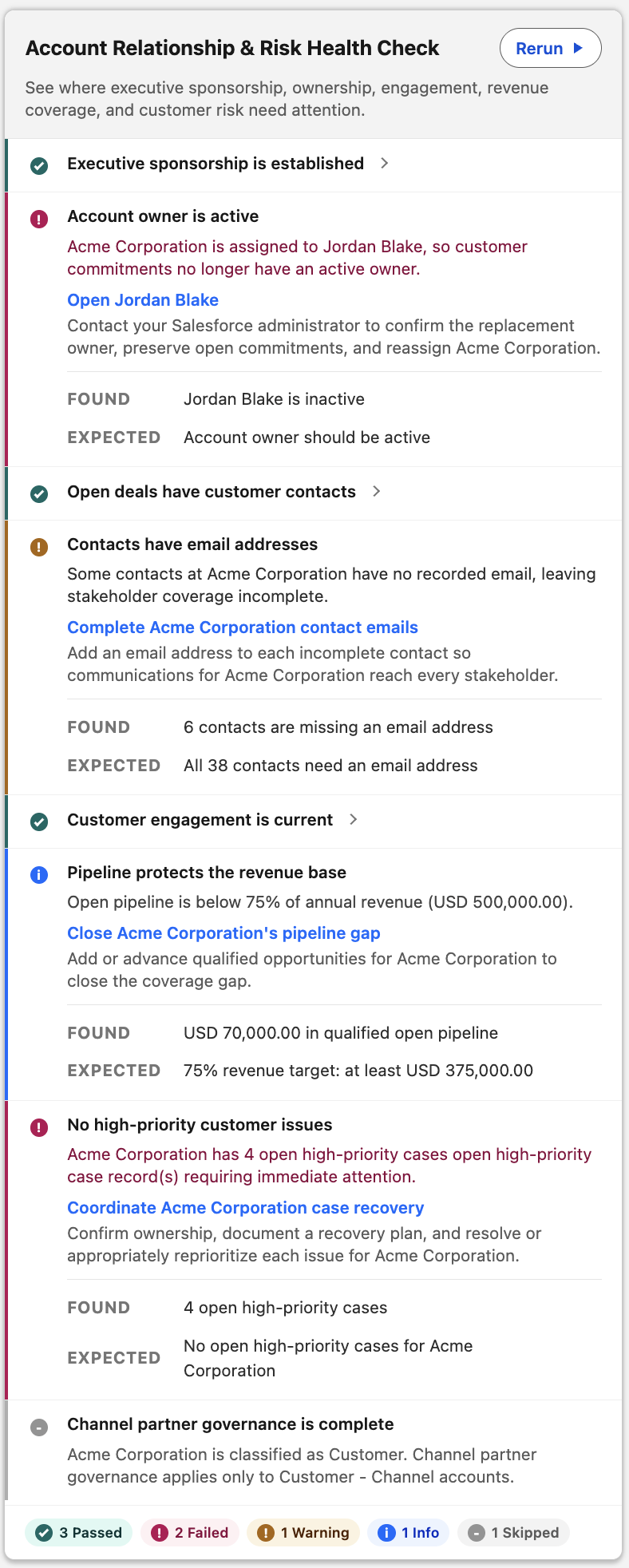
Read the card from top to bottom
Section titled “Read the card from top to bottom”| Area | What it tells you |
|---|---|
| Card title and subtitle | Which review is running and what the review is for |
| Summary | How many Checks passed, need attention, were skipped, could not be evaluated, or encountered a system error |
| Category heading | Which part of the business review the following Checks belong to |
| Check title and status | The question being reviewed and its result |
| Found and Expected | What Salesforce data was visible and what the Check required |
| Message and guidance | Why the result matters and what to do next |
| Action link | A safe navigation step, such as opening the record or a related list; it does not make the change automatically |
What the statuses mean
Section titled “What the statuses mean”| Card label | Meaning |
|---|---|
| Pass | The visible data met the Check |
| Failed, Warning, or Info | The Check completed with FAIL; severity controls the label |
| Skipped | The Check did not apply or a prerequisite did not allow it to run |
| Unable to Check | Access, data, or configuration prevented a reliable answer |
| System Error | The framework or a custom evaluator encountered a technical failure |
Different users can receive different reliable results because Record Health Check uses each running user’s Salesforce record and field access.
What administrators control
Section titled “What administrators control”The selected Check Set controls the card title, when it runs, summaries, result visibility, and Run/Rerun presentation. Each Check controls the business question, severity, messages, evidence, and optional action. Neither record changes nor save blocking are part of the card.